


Unlock Efficiency with a SpeedType Trial: Trial Software Benefits for Transcription Pros
If you spend hours typing medical or legal transcripts, you know how exhausting and time-consuming it can be. What if you could slash your typing time and boost your productivity with a simple tool? That’s where SpeedType comes in. I’ve been using it, and I want to share how a SpeedType trial version can unlock efficiency for you too.
Why Trial Software Benefits Matter for Transcriptionists
Trying software before buying is a smart move. It lets you test features, see if it fits your workflow, and avoid costly mistakes. For transcriptionists, this is crucial because your tools directly impact your earnings and work quality.
Here’s why trial software benefits are a game-changer:
Risk-free testing: You get to explore all features without commitment.
Hands-on experience: See how the software integrates with your existing Windows apps.
Evaluate speed and accuracy: Check if it really speeds up your typing.
Discover customization options: Tailor the tool to your specific transcription needs.
Make an informed decision: Avoid buyer’s remorse by knowing exactly what you’re getting.
When I first tried SpeedType, the trial helped me understand how it could fit into my daily routine. It wasn’t just about faster typing; it was about smarter typing.

How SpeedType Trial Version Boosts Your Productivity
SpeedType is designed specifically for Windows users who need text expansion and transcription assistance. The trial version lets you experience its core features firsthand:
Text expansion: Create shortcuts for frequently used phrases or medical/legal terms.
Auto-correction: Fix common typos instantly.
Custom macros: Automate repetitive tasks.
Universal compatibility: Works across all Windows applications, from Word to specialized transcription software.
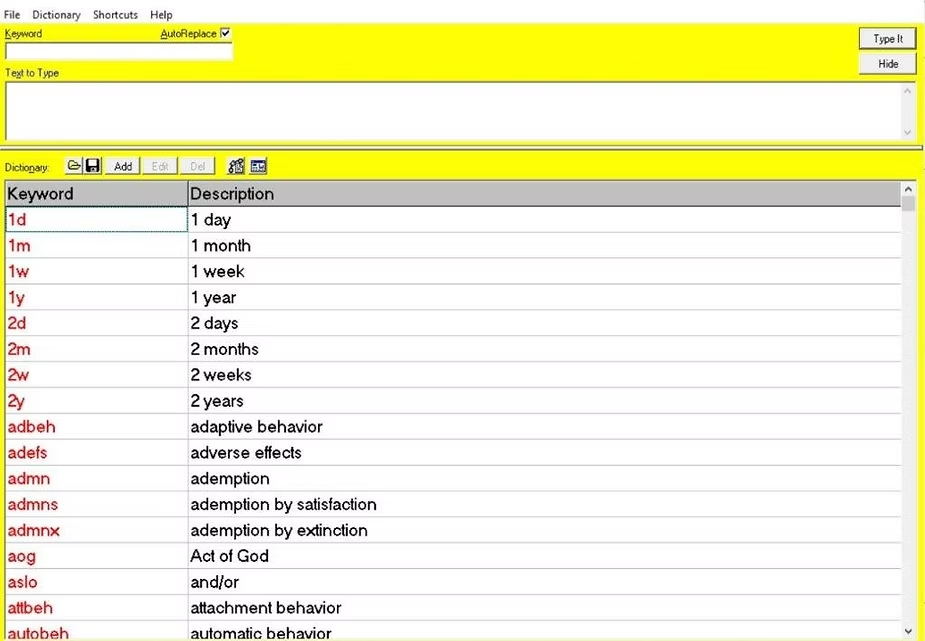
During my trial, I set up shortcuts for complex medical terms I type daily. Instead of typing “gastroesophageal reflux disease” every time, I just typed “gerd” and SpeedType expanded it instantly. This saved me minutes on every document.
The trial also showed me how easy it was to customize macros for legal transcription, like inserting standard disclaimers or formatting text blocks. This level of automation is a huge time saver.
Getting Started with Your SpeedType Trial
Starting your trial is straightforward. Here’s a quick guide to get you going:
Download the trial from the official SpeedType website.
Install the software on your Windows machine.
Explore the tutorial to understand basic functions.
Set up your first text expansions for common phrases.
Test it in your usual transcription apps to see the difference.
I recommend starting with a few simple shortcuts and gradually adding more as you get comfortable. The trial period is your playground to experiment without pressure.
Tips to Maximize Your SpeedType Trial Experience
To get the most out of your trial, keep these tips in mind:
Focus on your most repetitive tasks: Identify phrases or terms you type often and create shortcuts for them.
Use the auto-correct feature: Customize it to fix your common typos automatically.
Test macros for formatting: Automate paragraph styles or legal disclaimers.
Try it across different apps: Don’t limit yourself to one program; SpeedType works everywhere on Windows.
Take notes on what works and what doesn’t: This will help you decide if the full version is worth it.
By following these steps, you’ll see how much time you can save. I was amazed at how quickly my typing speed improved just by using a few shortcuts.
Why SpeedType is the Go-To Tool for Windows Transcriptionists
SpeedType aims to be the universal transcription software for Windows users. It’s built with professionals like you in mind, focusing on:
Efficiency: Cut down typing time drastically.
Flexibility: Use it with any Windows application.
Customization: Tailor it to medical or legal transcription needs.
Ease of use: Simple interface that doesn’t require tech expertise.
The trial version gives you a glimpse of these benefits without any upfront cost. It’s a chance to see how SpeedType can transform your workflow and increase your earnings.
If you want to try it yourself, check out the speedtype trial version and see how it fits your needs.
Take the Next Step Toward Faster Transcription
Don’t let slow typing hold you back. A SpeedType trial is your opportunity to unlock new levels of efficiency. You’ll save time, reduce errors, and enjoy a smoother transcription process.
Give it a try today. You might just find that SpeedType is the tool you’ve been waiting for to boost your productivity and earnings across all your Windows applications. Happy typing!


Comments